

- A proxy server is a system or router that provides a gateway between users and the internet. Therefore, it helps prevent cyber attackers from entering a private network.
- Proxies provide a valuable layer of security for your computer. They can be set up as web filters or firewalls, protecting your computer from internet threats like malware.
- Proxy servers are powerful tools that offer a range of benefits, from enhanced security and privacy to improved performance and access to restricted content.
We live in an era where privacy, security, and unrestricted access to content are paramount, and understanding the tools that can help achieve these goals is essential. One such tool is the proxy server. But what exactly is a proxy server, and how does it work?
Proxy servers are powerful tools that offer a range of benefits, from enhanced security and privacy to improved performance and access to restricted content. Understanding how proxy servers work and the different types available can help you make informed decisions about incorporating them into your digital toolkit. Whether you’re an individual seeking anonymity online or an organisation aiming to secure and optimise internet usage, proxy servers can be an invaluable asset in navigating the complex landscape of the internet.
Also read: What is back end speech recognition?
Proxy Server definition
A proxy server is a system or router that acts as a gateway between users and the internet, serving as a protective barrier to help prevent cyber attackers from accessing a private network. Known as an “intermediary,” it facilitates the interaction between end-users and the websites they visit online.
When a computer connects to the internet, it is assigned an IP address, similar to a street address, which directs incoming data to the correct destination and tags outgoing data with a return address for verification by other devices. A proxy server functions as a computer on the internet with its own unique IP address.
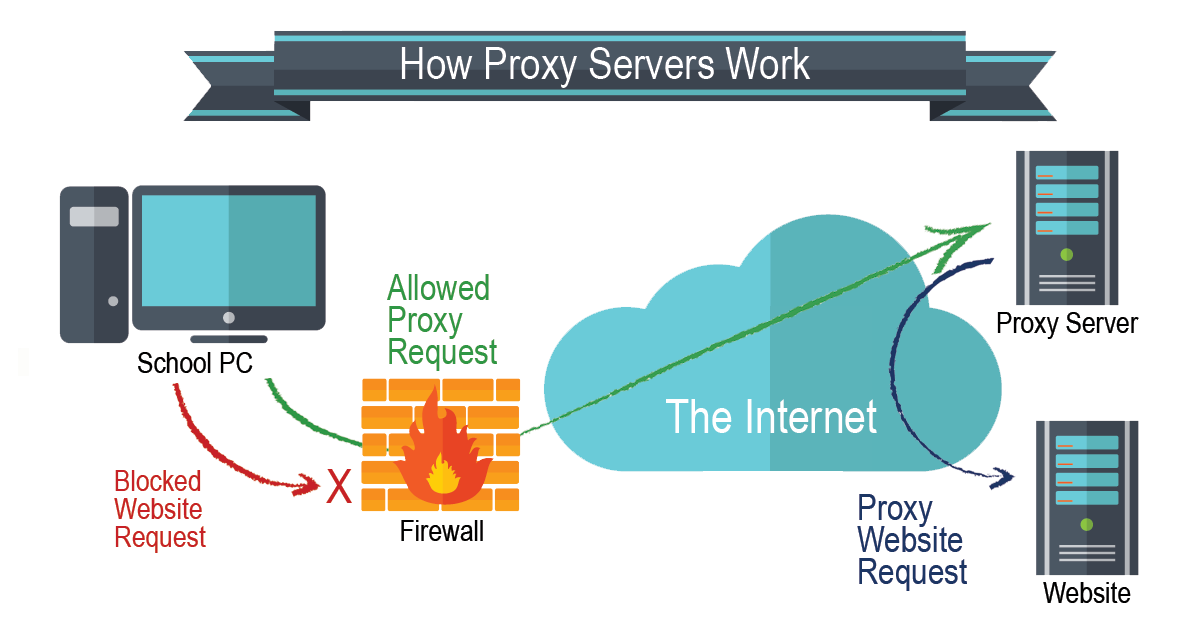
Proxy Servers and network security
Proxies provide a valuable layer of security for your computer. They can be set up as web filters or firewalls, protecting your computer from internet threats like malware.
This extra security is also valuable when coupled with a secure web gateway or other email security products. This way, you can filter traffic according to its level of safety or how much traffic your network—or individual computers—can handle.
How to use a proxy? Some people use proxies for personal purposes, such as hiding their location while watching movies online, for example. For a company, however, they can be used to accomplish several key tasks such as:
- Improve security.
- Secure employees’ internet activity from people trying to snoop on them.
- Balance internet traffic to prevent crashes.
- Control the websites employees and staff access in the office.
- Save bandwidth by caching files or compressing incoming traffic.
How a Proxy works?
Because a proxy server has its own IP address, it acts as a go-between for a computer and the internet. Your computer knows this address, and when you send a request on the internet, it is routed to the proxy, which then gets the response from the web server and forwards the data from the page to your computer’s browser, like Chrome, Safari, Firefox, or Microsoft Edge
Also read: AWS and Orange explore partnership for African cloud computing
How to Get a Proxy?
Proxy servers come in both hardware and software forms. Hardware proxies are physical devices that sit between your network and the internet, managing data retrieval, transmission, and forwarding. In contrast, software proxies are typically hosted by a provider or exist in the cloud. To use a software proxy, you download and install an application on your computer, which then manages your interactions with the proxy.
Software proxies are often available through subscription services, although some are free. Free versions usually offer limited addresses and may support only a few devices. In contrast, paid proxies can accommodate the extensive needs of a business with multiple devices.
Set up a Proxy Sever
To get started with a proxy server, you have to configure it in your computer, device, or network. Each operating system has its own setup procedures, so check the steps required for your computer or network.
In most cases, however, setup means using an automatic configuration script. If you want to do it manually, there will be options to enter the IP address and the appropriate port.
Proxy Protect computer privacy and data
A proxy server performs the function of a firewall and filter. The end-user or a network administrator can choose a proxy designed to protect data and privacy. This examines the data going in and out of your computer or network. It then applies rules to prevent you from having to expose your digital address to the world. Only the proxy’s IP address is seen by hackers or other bad actors. Without your personal IP address, people on the internet do not have direct access to your personal data, schedules, apps, or files.
With it in place, web requests go to the proxy, which then reaches out and gets what you want from the internet. If the server has encryption capabilities, passwords and other personal data get an extra tier of protection.
1. Benefits of a Proxy Server
Proxies come with several benefits that can give your business an advantage:
2. Enhanced security
Can act like a firewall between your systems and the internet. Without them, hackers have easy access to your IP address, which they can use to infiltrate your computer or network.
3. Private browsing, watching, listening, and shopping
Use different proxies to help you avoid getting inundated with unwanted ads or the collection of IP-specific data. With a proxy, site browsing is well-protected and impossible to track.
4. Access to location-specific content
You can designate a proxy server with an address associated with another country. You can, in effect, make it look like you are in that country and gain full access to all the content computers in that country are allowed to interact with. For example, the technology can allow you to open location-restricted websites by using local IP addresses of the location you want to appear to be in.
5. Prevent employees from browsing inappropriate or distracting sites
You can use it to block access to websites that run contrary to your organisation’s principles. Also, you can block sites that typically end up distracting employees from important tasks. Some organisations block social media sites like Facebook and others to remove time-wasting temptations.